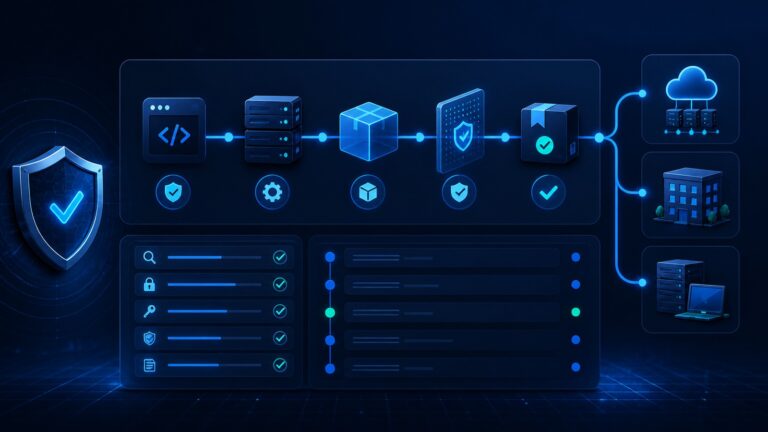
Quick answer: SASE gives small businesses a way to modernize secure remote access without stacking more VPN concentrators, firewall rules, and one-off SaaS controls. Instead of trusting a user because they reached the “inside” of the network, a SASE-style architecture combines identity, device posture, secure web access, zero-trust application access, and cloud-delivered policy enforcement.

For a small business, the point is not to buy every security acronym at once. The point is to stop treating the office network as the only safe place to work. If your team uses Microsoft 365 or Google Workspace, cloud CRM, password managers, support platforms, AI tools, contractor devices, and remote workers, your security model already lives outside the old perimeter. SASE is one way to organize that reality.
This guide explains what SASE means, how it differs from traditional VPN-first security, which components matter most for small businesses, when it is worth considering, and how to roll it out without turning a lean IT stack into an enterprise science project.
What is SASE?
SASE stands for Secure Access Service Edge. In plain English, it is a cloud-delivered architecture that brings networking and security services together so users can reach the applications they need from anywhere while policies are enforced consistently.
Cloudflare describes SASE as a model that converges network connectivity and security functions into a single cloud-based service platform. Common components include secure web gateways, cloud access security brokers, zero trust network access, firewall-as-a-service, and software-defined WAN. That sounds enterprise-heavy, but the small-business takeaway is simple: move access decisions closer to the user, identity, device, application, and data — not just the office router.
The idea also aligns with NIST’s zero trust architecture guidance, which says modern access should focus on users, assets, and resources rather than assuming trust based on network location. CISA’s Zero Trust Maturity Model similarly emphasizes least-privilege, per-request access decisions and granular control.
Why VPN-first security is showing its age
VPNs are not automatically bad. A well-managed VPN can still be useful for specific administrative workflows, legacy systems, or emergency access. The problem is that many small businesses use a VPN as a broad trust shortcut: log in once, land “inside,” and then reach far more than the user actually needs.
That model becomes fragile when the company has remote staff, outsourced support, cloud apps, unmanaged devices, AI tools, and data spread across SaaS platforms. A stolen credential, compromised laptop, or over-permissive contractor account can turn a convenience feature into a lateral-movement path.
SASE does not magically remove risk, but it changes the default question. Instead of asking “is this user on the network?” it asks “who is the user, what device are they using, what app are they trying to reach, what risk signals are present, and should this specific request be allowed?”
The core SASE components small businesses should understand
1. Zero Trust Network Access (ZTNA)
ZTNA is often the easiest SASE entry point for smaller teams. It provides application-level access rather than broad network-level access. A sales contractor might reach the CRM and a reporting dashboard, while never seeing internal admin tools. A developer might reach staging systems only from a managed device with multi-factor authentication enabled.
This is especially useful if your company has been relying on one shared VPN profile or flat firewall rules. ZTNA lets you reduce the blast radius of each account and each device.
2. Secure Web Gateway (SWG)
A secure web gateway helps protect users as they browse the web and use cloud applications. It can block risky destinations, apply DNS or URL filtering, inspect downloads depending on configuration, and reduce exposure to phishing or malware-heavy sites.
For small teams, SWG value is highest when employees work from home, travel frequently, or use laptops outside the office network. The policy follows the user rather than depending on them being behind the office firewall.
3. Cloud Access Security Broker (CASB)
A CASB helps govern SaaS usage. That can include visibility into unsanctioned apps, risky file sharing, OAuth app permissions, sensitive data movement, and policy violations inside cloud platforms.
If your business already worries about OAuth app permissions or shadow AI SaaS tools, this is where SASE becomes especially relevant. CASB-style controls give you a way to detect and manage cloud app sprawl before it becomes a compliance or data-loss issue.
4. Firewall-as-a-Service (FWaaS)
FWaaS shifts firewall controls from a physical appliance toward cloud-delivered enforcement. That can simplify security for companies with remote users, multiple small locations, or cloud-first application stacks.
Small businesses should be careful here: do not buy FWaaS because it sounds advanced. Consider it when you have outgrown a single-office firewall model, need consistent controls for distributed users, or are already consolidating networking and security vendors.
5. SD-WAN and traffic optimization
SD-WAN is more relevant when a company has multiple branches, retail locations, warehouses, or offices. It can route traffic intelligently across links and improve resilience. For a single-location company using mostly SaaS, SD-WAN may be less urgent than ZTNA, identity security, endpoint protection, and web filtering.
SASE vs. SSE vs. Zero Trust: what is the difference?
The terminology can get confusing. Here is the practical distinction:
- Zero trust is the security philosophy: verify explicitly, use least privilege, and do not trust purely because of network location.
- SSE (Security Service Edge) is the cloud-delivered security side, often including SWG, CASB, ZTNA, and data protection.
- SASE combines SSE-style security with networking capabilities such as SD-WAN and cloud edge connectivity.
For many small businesses, the first step is closer to SSE or zero-trust access than full SASE. That is fine. You do not need to deploy the entire architecture in one quarter to get value.
When SASE makes sense for a small business
SASE is worth evaluating when several of these are true:
- Your team is hybrid or remote by default.
- Most critical apps are SaaS or cloud-hosted.
- You still rely on a broad VPN for internal access.
- Contractors, agencies, or part-time staff need limited application access.
- You have multiple offices or a growing distributed workforce.
- You need better visibility into SaaS usage, file sharing, or shadow IT.
- You want consistent security controls without managing more hardware appliances.
If you only have five employees in one office and a very simple SaaS stack, you may not need a full SASE platform yet. Start with strong MFA, a business password manager, endpoint protection, device encryption, least-privilege SaaS roles, and a documented offboarding process. Then add ZTNA or secure web controls when the access model gets more complex.
A small-business rollout plan
Step 1: Map the real access paths
List your users, devices, core SaaS apps, admin panels, cloud servers, and legacy systems. Include contractors and shared mailboxes. Note which systems still require VPN access and which are reachable directly over the public internet.
Step 2: Fix identity first
SASE cannot compensate for weak identity hygiene. Require MFA for admins and core apps, remove shared accounts, use role-based groups, and review OAuth app permissions. If your identity provider is messy, SASE policy will inherit that mess.
Step 3: Replace broad VPN access with app-specific access
Pick one internal app or admin workflow and put it behind ZTNA. Test user groups, device requirements, MFA prompts, session duration, logging, and break-glass access. Avoid migrating everything at once.
Step 4: Add web and SaaS visibility
Once access is working, add secure web gateway and CASB-style visibility where it solves a real problem: phishing risk, risky downloads, unmanaged SaaS, public file sharing, or shadow AI usage. This supports your broader AI vendor risk and cloud-app governance work.
Step 5: Consolidate deliberately
Vendor consolidation can reduce complexity, but only if the platform covers the controls you actually need. Ask whether your team can operate the policy model, understand the logs, handle exceptions, and maintain the deployment over time.
Questions to ask SASE vendors
- Can we publish private applications without exposing them to the public internet?
- How granular are user, device, location, and application policies?
- Does the platform integrate with our identity provider and endpoint tools?
- Can contractors receive limited app access without broad network access?
- What logs are retained, and can we export them to our monitoring stack?
- How does the product handle unmanaged devices and BYOD?
- Which security features are included in the plan we can actually afford?
- How disruptive is the migration from our current VPN?
- What happens if the SASE provider has an outage?
Common mistakes to avoid
- Buying the acronym instead of solving the access problem. Start with your riskiest access paths, not a feature checklist.
- Skipping identity cleanup. Bad groups and stale accounts create bad SASE policies.
- Keeping the old VPN as a permanent backdoor. During migration it may be necessary; long term it can undermine least privilege.
- Overblocking on day one. Roll out policy in stages so you can tune false positives without frustrating the whole company.
- Ignoring SaaS and OAuth risk. Remote access is only one part of the cloud-security picture.
How SASE fits the broader small-business security stack
SASE should not replace the basics. It works best alongside endpoint protection, a password manager, phishing-resistant MFA where possible, security awareness, backup discipline, and clear incident-response steps. If you are still building that foundation, CyberTrendLab’s VPN vs password manager vs endpoint security guide can help prioritize the core layers.
Think of SASE as the access and policy layer for a cloud-first business. It helps answer: who can reach what, from which device, under which conditions, and with what monitoring. That is increasingly important as small companies adopt more SaaS tools, AI assistants, and distributed work patterns.
Final verdict
SASE is not mandatory for every small business, but the problems it addresses are becoming common: remote work, SaaS sprawl, contractor access, cloud-hosted systems, and security policy scattered across too many tools. If your VPN has become a broad doorway into the company, or if you cannot clearly explain which users can access which apps and why, it is time to evaluate SASE-style controls.
The smart path is incremental. Clean up identity. Replace broad VPN access with application-specific ZTNA. Add web and SaaS visibility where risk justifies it. Then consider broader SASE consolidation when your company needs consistent access and security policy across users, devices, locations, and cloud apps.
FAQ
Does SASE replace a VPN?
It can replace many VPN use cases, especially broad remote access to internal applications. Some companies still keep a limited VPN for legacy systems or emergency administration, but the goal is to reduce always-on, network-wide access.
Is SASE too expensive for small businesses?
Full enterprise SASE can be overkill. Smaller teams should start with the pieces that solve immediate risk, usually identity cleanup, ZTNA, secure web controls, and SaaS visibility. Compare plan limits carefully before buying.
What is the first SASE project to try?
Start by moving one sensitive internal application or admin tool behind zero-trust application access. Measure login friction, policy accuracy, logging quality, and support effort before expanding.
How is SASE related to zero trust?
Zero trust is the security model; SASE is an architecture that can help deliver zero-trust access and cloud-delivered security controls across distributed users and applications.
Should a small business choose one SASE vendor or multiple tools?
Choose based on operational fit. A single platform can simplify management, but only if it covers your real requirements. A staged approach with best-fit tools may be safer if you are still learning your access and SaaS-risk needs.