Close CRM is not just another place to store contacts. It is a sales-focused CRM built around the work that sales teams do every day: calling leads, sending emails, texting prospects, following up, moving deals through a pipeline, tracking activity, and measuring whether the team is actually creating revenue opportunities.
That difference matters. A lot of CRMs become databases that sales reps update after the real work happens somewhere else. Close CRM tries to make the CRM the actual sales workspace. Calls, emails, SMS, tasks, opportunities, lead records, reporting, workflows, and AI assistance all live inside the same system.
In this deep Close CRM review, we will cover what Close does, who it is best for, what makes it different, where it is strong, where it can be limiting, what to know about pricing, and how to decide whether it is worth using for your business.
Close CRM Review: Quick Verdict
Close CRM is best for sales teams that win through fast follow-up, frequent conversations, outbound activity, and disciplined pipeline management. If your team relies on calls, email, SMS, sequences, reminders, and deal tracking, Close is one of the most practical CRMs to evaluate.
The main reason to choose Close is focus. It is not trying to be a giant all-in-one business operating system. It is built for sales execution. That means it can feel much cleaner and faster than broader CRMs if your biggest problem is getting leads contacted, followed up with, qualified, and closed.
- Best for: founders, small sales teams, B2B sales teams, agencies, consultants, and outbound teams.
- Biggest strength: built-in sales communication: calls, email, SMS, power dialing, and activity history.
- Main caution: if you want a broad CRM for every department, Close may feel too sales-specific.
- Verdict: excellent fit for teams that want a CRM where sales work actually happens, not just where sales work is recorded.
What Is Close CRM?
Close is a customer relationship management platform designed primarily for sales teams. Its core idea is simple: sales reps should not need one tool for calling, another for email, another for texting, another for the pipeline, another for reporting, and another for automation. Close brings those pieces into one sales-focused workspace.
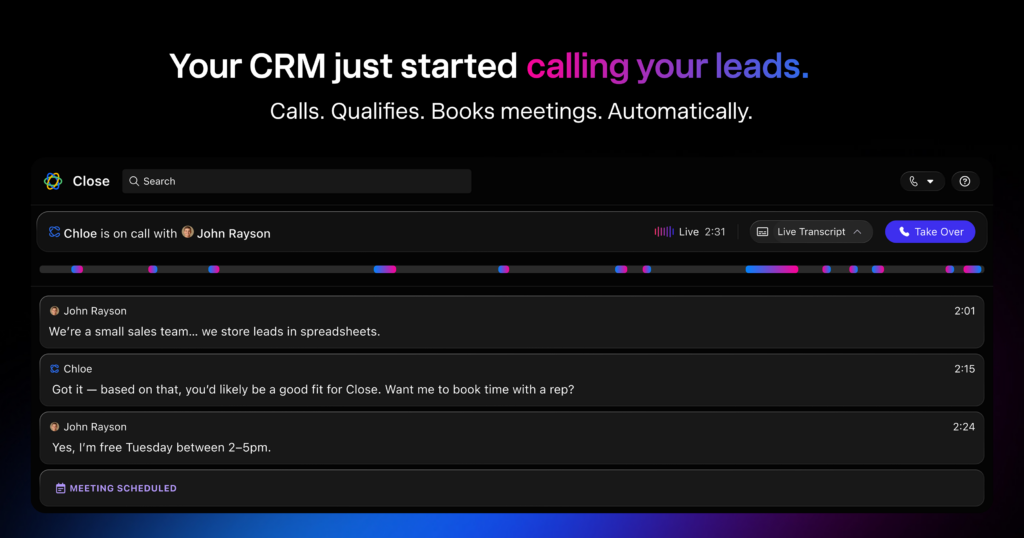
According to Close’s own product positioning, the platform includes sales communication, email, calls, SMS, sales automation, lead and pipeline management, a built-in power dialer, native forms, reporting, integrations, and Chloe, its AI sales agent. That combination makes Close especially relevant for teams that care about speed-to-lead and consistent follow-up.
Instead of thinking of Close as a generic CRM, it is better to think of it as a sales engagement CRM. It stores records, but it also helps your team take action on those records. That is the difference between a CRM that quietly becomes shelfware and a CRM that actually becomes part of the daily selling process.
The Problem Close CRM Is Trying to Solve
Most sales teams do not lose deals only because they lack a CRM. They lose deals because leads are not contacted quickly enough, follow-ups are forgotten, call notes are scattered, email threads are disconnected from the pipeline, and managers cannot easily see what activity is driving results.
That is where Close makes sense. It is built around activity. A lead record in Close is not just a static profile; it is where calls, emails, SMS messages, tasks, notes, opportunities, and history come together. For a rep, that means less jumping between tools. For a manager, it means a clearer picture of what is happening across the pipeline.
If your sales process is simple and mostly inbound, you may not need all of that. But if you have meaningful lead volume, multiple reps, active outreach, demos, consultations, or a pipeline that needs consistent follow-up, Close solves a real operational problem.
Close CRM Interface and Daily Workflow
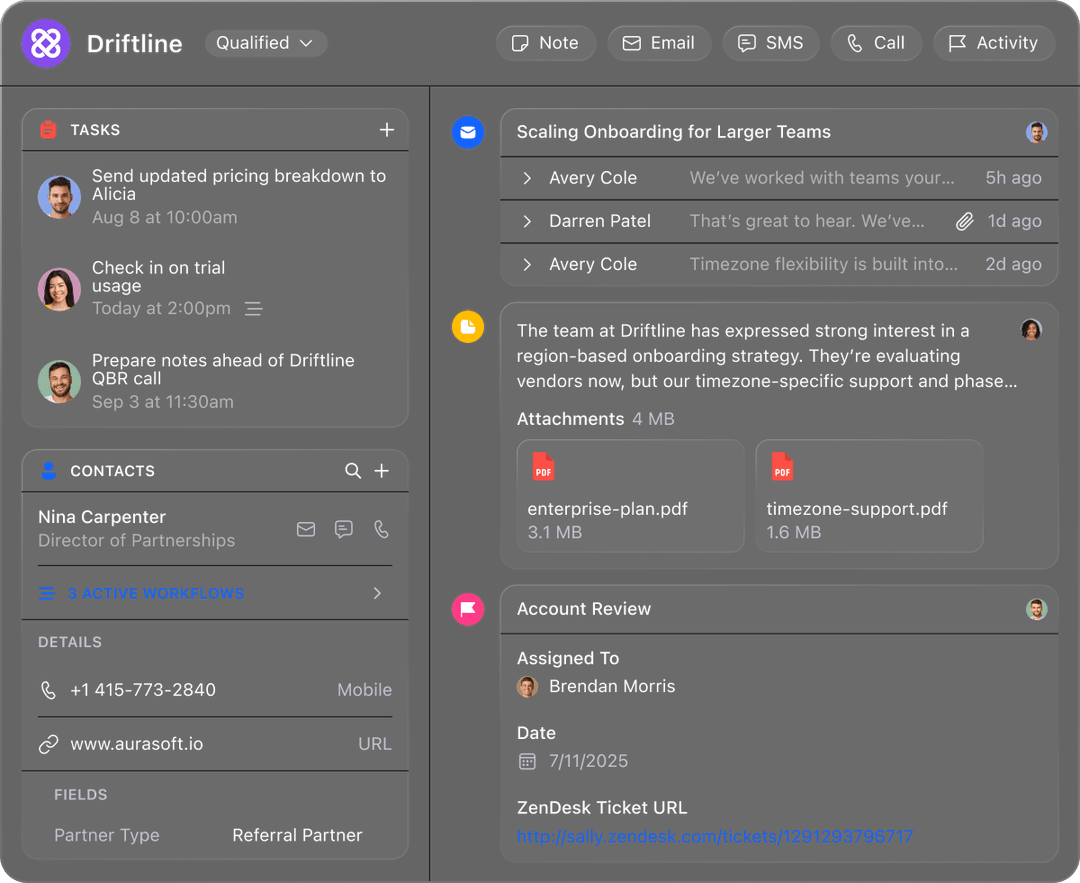
The strongest CRM is usually the one the team actually uses. Close’s interface is designed around sales conversations and lead context. A sales rep can open a lead, see the contact details, check the activity history, review tasks, send an email, make a call, send an SMS, and move the deal forward from one place.
This is a major usability advantage over systems where the CRM is separate from the tools reps use to communicate. When tools are separate, data gets missed. Calls are not logged. Notes live in the wrong place. Follow-ups depend on memory. Close reduces that friction by keeping the sales record and the sales action together.
Built-In Calling: One of Close’s Biggest Advantages
Close is especially strong for teams that still use the phone as a serious sales channel. Built-in calling is one of the platform’s biggest differentiators. Instead of manually dialing from a separate phone system and then logging the result inside a CRM, reps can call directly from Close and keep the activity connected to the lead record.
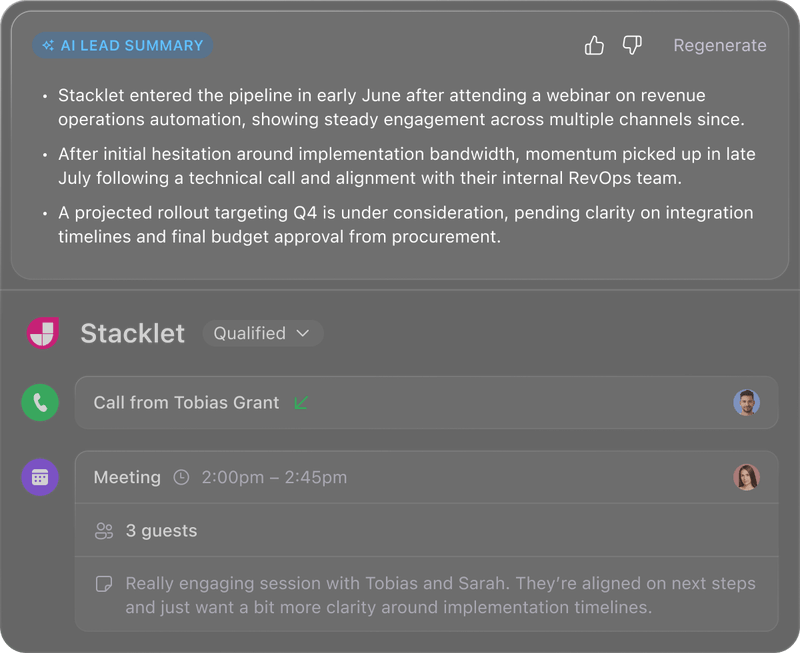
Close’s calling features are designed for speed and consistency. The platform highlights built-in calling, power dialing, predictive dialing, voicemail drops, call recording, call coaching, and AI summaries. For a high-volume outbound team, those features can have a direct effect on output. More completed calls, cleaner logging, and easier coaching can improve both rep productivity and management visibility.
The value is not only the dialer itself. It is the fact that calling is part of the CRM workflow. A rep can call, record the result, send a follow-up email, create a task, and move the opportunity without leaving the system. That is exactly the kind of workflow where Close is at its best.
Email, SMS, and Follow-Up
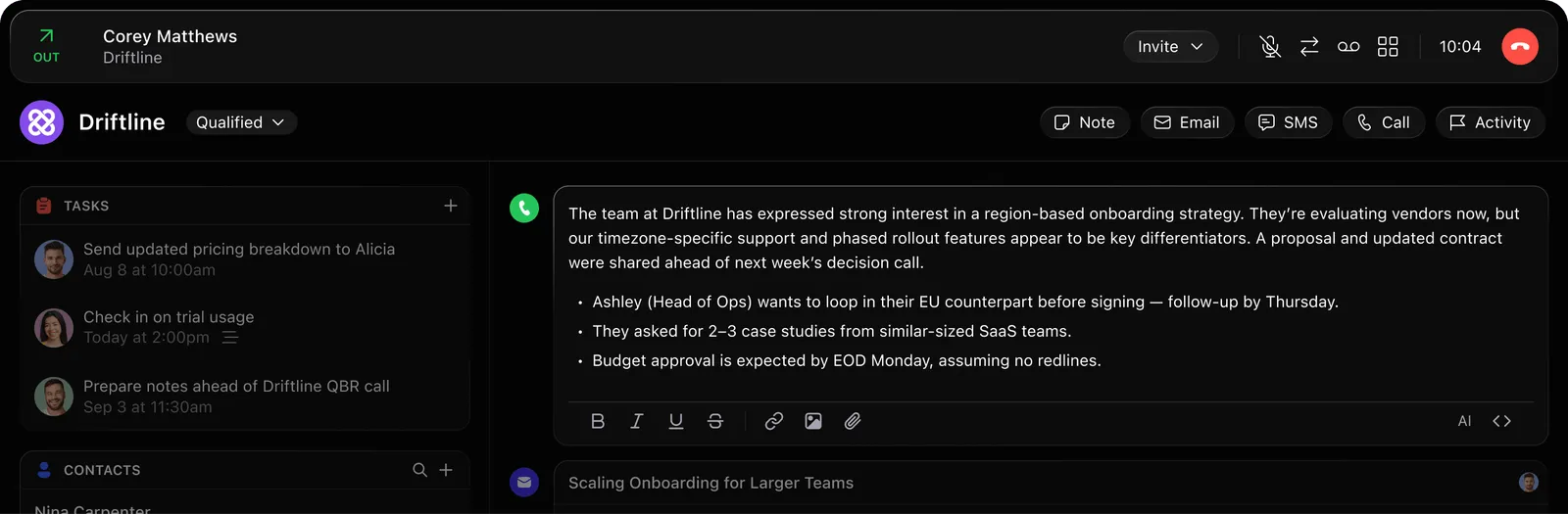
Sales follow-up rarely happens through one channel. A prospect may answer an email, ignore a call, reply to a text, then book a meeting later. Close is designed to keep those interactions tied to the same lead and pipeline history.
For small teams, this can remove a lot of chaos. Instead of digging through Gmail, a texting tool, a phone system, and a spreadsheet, the rep can work from the lead record. That makes it easier to understand what happened, what needs to happen next, and whether the prospect is actually moving forward.
This is also useful for handoffs. If one rep is unavailable or a manager needs to inspect a deal, the communication history is not trapped in someone’s personal inbox. The context is available in the CRM.
Pipeline and Opportunity Management
Close includes the expected CRM fundamentals: leads, contacts, opportunities, pipeline stages, tasks, and activity history. The important part is how tightly those fundamentals connect to sales action.
A good pipeline should answer basic questions quickly: Which deals are active? Which prospects need follow-up? Where are opportunities getting stuck? Which reps are creating real conversations? Which leads are going cold? Close is designed to make those questions easier to answer because the communication layer and pipeline layer are connected.
For founder-led sales, this is useful because it brings structure without requiring a huge operations setup. For teams, it helps create a shared language around stages, activities, and ownership. But the platform will only be as good as the process you build into it. If your pipeline stages are vague or your team does not maintain discipline, Close will not magically fix that. It gives you the tools; you still need a clear sales process.
Sales Automation and Workflows
Automation is another important part of Close. The goal is not to replace the sales team; it is to remove repetitive work and make sure follow-up happens reliably. Close’s pricing page describes workflows that can automate outreach, trigger SMS, email, and call follow-ups when leads match certain criteria, update CRM records, enrich leads using AI, and create opportunities using workflows.
That kind of automation is valuable when the sales process has clear rules. For example, a new lead can trigger a task or sequence. A deal moving to a certain stage can trigger a reminder. A lead that has not replied can receive a follow-up step. A qualified lead can be pushed toward the next action.
The warning is that automation should support a good sales process, not hide a bad one. If your messaging is weak, your targeting is poor, or your pipeline stages are messy, automation can simply help you do the wrong things faster. Close is strongest when you already know what good follow-up should look like and want the software to enforce it consistently.
Chloe and AI Features
Close now puts significant emphasis on Chloe, its AI sales agent. Close describes Chloe as an AI sales agent that can help qualify, follow up, and act on leads. The official messaging also highlights AI-assisted calling, AI summaries, and AI-driven workflow capabilities.
This is one of the more interesting parts of Close’s direction. Many CRMs add AI as a side feature: summarize a note, draft an email, or answer a question. Close’s positioning suggests a more active role for AI inside the sales process. That may become increasingly important for teams that want reps spending more time on qualified conversations and less time on repetitive lead handling.
Still, AI features should be evaluated carefully. The real value depends on your lead quality, sales process, compliance needs, and how comfortable you are with AI-assisted communication. For some teams, it may be a major productivity boost. For others, it may be something to test gradually before relying on it heavily.
Reporting and Sales Visibility
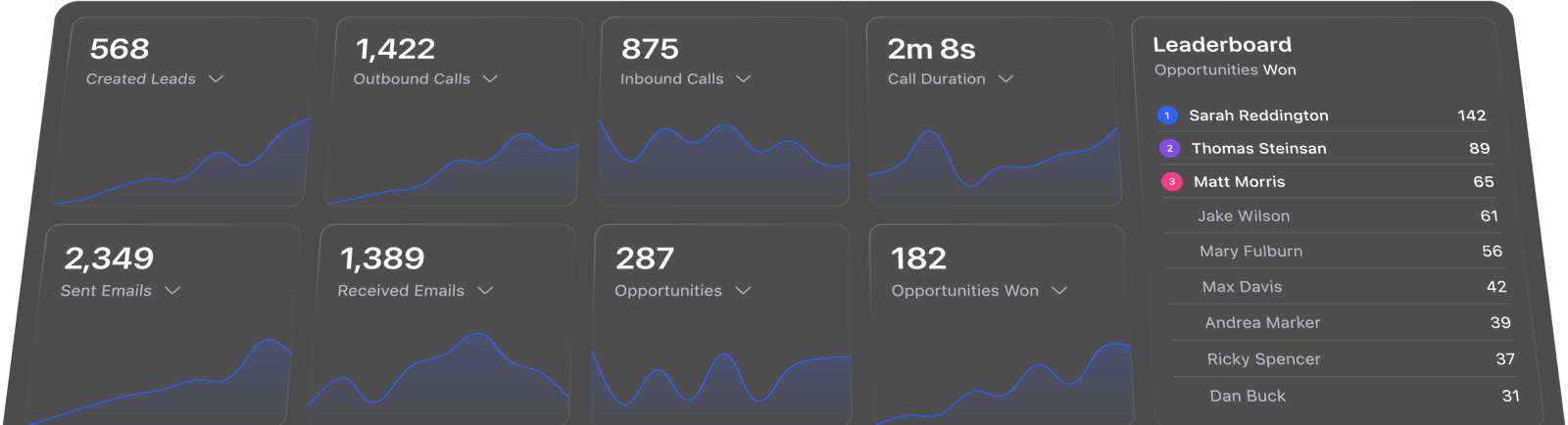
Sales managers need more than a list of deals. They need to know whether the team is creating activity, whether activity is turning into conversations, whether conversations are turning into opportunities, and whether opportunities are turning into revenue. Close includes reporting for pipeline, activity, and forecasting, which helps teams understand what is actually happening.
Because Close tracks communication inside the CRM, reporting can be more connected to actual sales behavior. That is important. A pipeline report without activity context can be misleading. A rep may have many open deals but too little recent contact. Another rep may have fewer deals but stronger activity and faster follow-up. Close is designed to make those differences easier to see.
Integrations and Ecosystem
Close also supports integrations. Close’s own navigation highlights integrations with ChatGPT, Claude, WhatsApp, and 100+ more tools. This matters because no CRM exists in isolation. You may need to connect forms, calendars, data enrichment tools, customer support software, marketing tools, automation platforms, or internal systems.
The key question is whether Close integrates with the tools your team already uses. Before committing, check your email setup, calendar needs, lead capture source, call requirements, SMS requirements, reporting stack, and any automation platform you depend on. Close is strong as a sales workspace, but you should still confirm the surrounding stack before moving your team.
Close CRM Pricing: What to Know
Close’s public pricing page currently lists Solo, Essentials, Growth, and Scale plans. At the time this review was updated, the pricing page showed annual prices starting at $9 per user per month for Solo, $35 per user per month for Essentials, $99 per user per month for Growth, and $139 per user per month for Scale. Monthly pricing was shown higher than annual pricing.
Pricing pages change, so always check the latest details before buying. The important point is that Close is not positioned as a free lightweight contact manager. It is a serious sales tool. The value calculation should be based on whether it helps your team respond faster, make more quality touches, reduce missed follow-ups, improve pipeline visibility, and close more deals.
For a solo founder, the entry plan can be a reasonable way to move beyond spreadsheets. For a team, the higher tiers may make sense if the built-in calling, automation, AI, reporting, and controls replace separate tools or improve sales productivity enough to justify the cost.
What I Like About Close CRM
- It is sales-first. Close is clearly built for people who sell, not just for administrators who need a database.
- Communication is built in. Calls, email, and SMS inside the CRM reduce tool switching and make the activity history cleaner.
- It supports high-activity sales teams. Power dialing, call logging, voicemail drops, workflows, and activity reporting are useful for outbound and follow-up-heavy sales processes.
- The interface is focused. Close avoids some of the bloat that makes larger CRMs intimidating for small teams.
- Reporting is tied to real activity. Because activity happens in the CRM, managers can get better visibility into what reps are doing.
- The AI direction is practical. Chloe and AI summaries are connected to sales workflow rather than feeling like disconnected AI gimmicks.
What Could Be Better
- It may be too sales-specific for some companies. If you want one platform for sales, support, marketing, operations, and finance, Close may not be broad enough.
- Per-user pricing can add up. Like most serious CRMs, the cost increases as your team grows.
- You still need sales discipline. Close gives you structure, but it cannot fix unclear messaging, weak offers, poor targeting, or bad pipeline hygiene by itself.
- AI features should be tested carefully. AI-assisted selling is promising, but every business should evaluate quality, compliance, and customer experience before relying on it heavily.
- Teams with simple needs may not need it. If you only need a basic contact list and occasional reminders, Close may be more powerful than necessary.
Who Close CRM Is Best For
Close is a strong fit for teams where sales activity is central to growth. That includes B2B sales teams, founder-led sales teams, agencies, consultants, appointment-setting teams, high-ticket service businesses, software companies, and outbound sales organizations.
It is especially useful when you have a repeatable sales process: lead comes in, rep contacts quickly, qualification happens, follow-up is needed, opportunity moves through stages, and management needs visibility. Close is designed for that kind of motion.
- Founders who are tired of managing prospects in spreadsheets
- Small teams that want calls, emails, texts, and pipeline in one tool
- Outbound teams that need power dialing and structured follow-up
- Sales managers who want better activity and pipeline reporting
- Teams interested in AI-assisted qualification and follow-up
Who Should Not Use Close CRM?
Close is not the best fit for everyone. If you need a free personal CRM, a simple address book, or a broad all-in-one platform for many departments, you may be better served by a different tool. Close is optimized for sales execution, and that focus is both its advantage and its limitation.
If your team rarely calls leads, does not use structured follow-up, and does not have a meaningful pipeline, you may not get the full value from Close. You would be paying for a sales engine when you only need a contact database.
Close CRM Compared With Traditional CRMs
Traditional CRMs often emphasize customization, data structure, and broad business use cases. That can be powerful, but it can also create friction. Sales reps may feel like the CRM is something they update for management rather than something that helps them sell.
Close is different because it puts sales communication at the center. The CRM is not just a record system; it is a calling, emailing, texting, follow-up, and pipeline workspace. That makes it a better fit for teams that care more about speed and activity than enterprise-level customization.
If your sales organization is large, complex, and deeply integrated into custom operations, you may need a broader CRM. But if your priority is getting reps to contact leads faster and follow up better, Close may feel much more practical.
Close CRM Setup Tips
If you decide to test Close, do not just import contacts and hope the software improves everything. Set it up around a real process.
- Define your pipeline stages. Make sure each stage means something specific and observable.
- Connect communication channels. Set up calling, email, and SMS according to your team’s workflow.
- Create follow-up rules. Decide when leads should be contacted, how many attempts are appropriate, and when opportunities should be moved.
- Use tasks and workflows carefully. Automate repetitive steps, but avoid creating noisy automation that reps ignore.
- Review reports weekly. Look at activity, response, pipeline movement, and bottlenecks.
- Test AI features gradually. Start with summaries and assistance before depending on AI for important customer-facing steps.
Close CRM Pros and Cons
Pros
- Built-in calling, email, and SMS
- Strong fit for outbound and high-follow-up sales
- Power dialer and calling tools
- Clean sales-focused interface
- Useful reporting and activity visibility
- Automation and AI direction are relevant to real sales workflows
Cons
- May be too focused for companies needing a broad business suite
- Pricing can grow with team size
- Requires a clear sales process to get full value
- Not necessary for very simple contact management
- AI features should be validated before heavy reliance
Final Verdict: Is Close CRM Worth It?
Close CRM is worth it if your business depends on active sales conversations and disciplined follow-up. Its biggest strength is that it turns the CRM into the place where sales work happens. Reps can call, email, text, log activity, manage opportunities, review context, and follow up without constantly switching tools.
For founders and small teams, Close can be a major upgrade from spreadsheets and scattered inboxes. For outbound teams, its calling and workflow features can improve productivity. For managers, its reporting and activity visibility can make pipeline reviews more useful. For teams exploring AI-assisted selling, Chloe and AI summaries make Close one of the more interesting CRMs to watch.
The main question is whether your sales process is active enough to justify it. If you need a passive database, Close may be too much. If you need a practical sales execution system, it is one of the better options available.
If you want to test the platform yourself, you can try Close CRM here.
Close CRM Review FAQ
Is Close CRM good for small businesses?
Yes, Close can be a strong fit for small businesses that actively sell through calls, email, SMS, demos, consultations, or outbound follow-up. It may be too much if you only need a basic contact list.
Does Close CRM include calling?
Yes. Built-in calling is one of Close’s main strengths. Close highlights calling tools such as power dialing, predictive dialing, voicemail drops, call recording, call coaching, and AI summaries.
Does Close CRM include email and SMS?
Yes. Close is designed to bring email, calls, and SMS into one sales workspace so teams can keep communication history connected to lead and deal records.
Is Close CRM only for outbound sales?
No, but outbound and follow-up-heavy teams are where Close is especially strong. Inbound teams can also benefit if they need fast response times, structured qualification, and clear pipeline tracking.
Is Close CRM worth the price?
It can be worth the price if it helps your team create more conversations, reduce missed follow-ups, improve visibility, and close more deals. If your needs are very simple, a lighter CRM may be enough.
Affiliate disclosure: this Close CRM review contains an affiliate link. If you sign up through it, CyberTrendLab may earn a commission at no extra cost to you.